TobenONE’s 18-in-1 Laptop Docking Station is aimed at people who want one hub to replace a messy stack of adapters.
This TobenONE 18-in-1 Laptop Docking Station review focuses on the kind of desktop setup it supports, what it does well, and where the tradeoffs are.
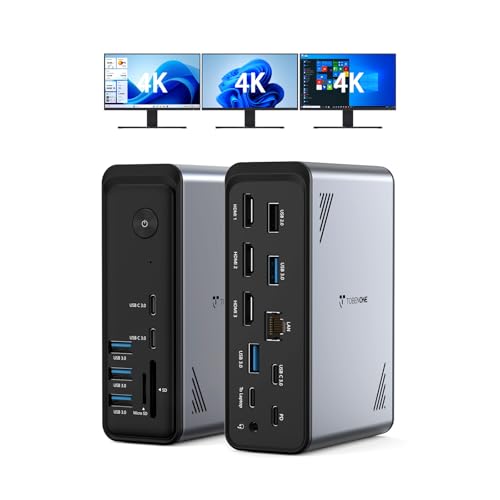
TobenONE Docking Station Review Summary
The TobenONE 18-in-1 Laptop Docking Station makes the most sense for Windows or Chrome OS users who need a serious expansion hub with display output, charging, and lots of peripheral connectivity in one unit.
If your work setup depends on multiple monitors, a wired network, and several USB accessories, this product is built around that use case rather than around minimal desk clutter.
Its main appeal is straightforward: it combines triple 4K HDMI support, nine USB ports, Ethernet, SD and microSD slots, audio output, and 100W PD charging into a single dock.
That is a broad feature set for office work, home workstations, editing, spreadsheets, conferencing, and general productivity.
The limitation is equally clear: it is designed for specific laptop types and is not a universal solution for every USB-C notebook.
Review Scorecard
| Category | Score | Rationale |
|---|---|---|
| Display Expansion | 9/10 | Triple 4K HDMI support is the headline feature and fits multi-monitor desks well. |
| Port Variety | 9/10 | The 18-in-1 layout covers USB, Ethernet, storage cards, audio, and host/power connections. |
| Power Delivery | 8/10 | 100W PD charging is strong for a dock in this class, though it is still one shared power path. |
| Productivity Fit | 9/10 | It is clearly built for office-style multitasking, conferencing, and peripheral-heavy setups. |
| Compatibility Clarity | 7/10 | The listing narrows the target to Windows and Chrome OS laptops with full-featured USB-C. |
| Desk Simplicity | 8/10 | One dock can replace several adapters and reduce cable clutter. |
Key Features and Specifications of TobenONE Docking Station
The key selling point is the 18-port design.
According to the listing, the dock includes nine USB ports plus PD, host, three HDMI ports, RJ45 Ethernet, SD, microSD, and 3.5mm audio.
That is enough to support a laptop-centered desk without constantly swapping cables.
Display support is the other major feature.
TobenONE positions this as a docking station for dual or triple 4K@60Hz display use, which is especially relevant for users who want more screen space for documents, meetings, editing, or monitoring multiple apps at once.
Charging is handled through 100W PD support.
The product is intended to power the laptop while everything else stays connected, which is the practical difference between a dock that looks impressive and one that actually helps daily workflow.
The compatibility note matters.
The listing says it is designed for Windows and Chrome OS laptops with full-featured USB-C ports, including brands such as Dell, Lenovo, HP, and ThinkPad.
That makes the product more focused, but it also means buyers should verify laptop support before assuming it will work as expected.
| Spec | What the listing says |
|---|---|
| Ports | 18 total |
| USB | 9 USB ports |
| Video | 3 HDMI ports |
| Display support | Dual/triple 4K@60Hz |
| Charging | 100W PD |
| Network | Ethernet/RJ45 |
| Media slots | SD and microSD |
| Audio | 3.5mm audio |
| Intended systems | Windows and Chrome OS |
| Laptop examples | Dell, Lenovo, HP, ThinkPad |
| Power adapter | Not included |
Pros and Cons of TobenONE Docking Station
Pros
- Very broad port selection for a single desktop hub.
- Triple-display support makes it attractive for heavier multitasking.
- 100W PD charging helps keep a laptop powered while everything stays connected.
- Built for office workflows where Ethernet, storage cards, and USB peripherals matter.
- Good cable consolidation if you want fewer adapters on the desk.
Cons
- Compatibility is not universal and is aimed at specific USB-C laptop types.
- No power adapter included, so the total setup is not completely self-contained.
- The feature set is dense, which is useful for power users but unnecessary for simple setups.
- It is not the best match for buyers who only need one external display and a couple of USB ports.
Who Should Buy TobenONE Docking Station?
This dock is a strong fit for people who work from a laptop but want a desktop-like station with multiple monitors and several permanent peripherals.
If you routinely use a keyboard, mouse, external drives, Ethernet, card readers, and a headset, the TobenONE 18-in-1 Laptop Docking Station is built to keep all of that connected.
It also fits users who have outgrown simple dongles.
Once a setup includes two or three displays and a few accessories, a more capable dock usually becomes easier to live with than juggling separate adapters.
You should probably skip it if your laptop does not have the right full-featured USB-C support, or if you do not need triple displays.
In that case, the dock’s strengths become unnecessary complexity.
Buyers with very simple needs will likely be happier with a smaller, cheaper hub.
Triple-Display Docking for Multi-Monitor Desks
Three Screens, One Hub
The clearest reason to buy this TobenONE dock is its triple HDMI output.
That gives it a more ambitious desktop role than a basic travel adapter and makes it useful for people who treat the laptop as the center of a permanent workstation.
Built for Workflow, Not Minimalism
The listing repeatedly points toward productivity use cases such as video editing, spreadsheet work, and conferencing.
That lines up with the hardware choice: many ports, multiple displays, and Ethernet are all signs of a dock made for work rather than casual use.
Peripheral-Heavy Setups
Nine USB ports are more than enough for typical office accessories and extra drives.
If your desk already includes a wired mouse, keyboard, storage, webcam, or other USB gear, this dock is designed to absorb that complexity.
Compatibility Is the Gatekeeper
The strongest feature set only matters if the laptop is compatible.
TobenONE’s own listing narrows the target to Windows and Chrome OS systems with full-featured USB-C, so buyers should treat compatibility as a required check, not a footnote.
Alternatives to TobenONE Docking Station
If you want a different style of dock or a brand with a more familiar ecosystem, these Amazon search options are worth comparing:
These alternatives are worth a look if you want to compare port layout, monitor support, and brand fit before committing to a desk dock.
Is TobenONE Docking Station Worth It?
Yes, if you want a feature-heavy dock for a Windows or Chrome OS laptop and you will actually use the triple-display and multi-port layout.
The TobenONE 18-in-1 Laptop Docking Station is most compelling for a productivity desk where Ethernet, card slots, USB accessories, and 100W charging all matter together.
It is less compelling for light users or anyone who only needs a simple two-port hub.
For the right setup, though, this is a practical all-in-one expansion dock rather than a gimmicky port collector.
If your laptop matches the compatibility requirements and your desk can benefit from a real expansion station, it is a sensible buy.